For most IT leaders in 2026, an ITSM implementation isn’t a greenfield project. It’s a rescue mission.
Industry data and our own experience with hundreds of migrations suggest that the vast majority of mid-to-large enterprises aren’t deploying ITSM on a clean slate. They’re trying to escape rigid legacy platforms, sprawling SaaS environments, or heavily customized ticketing systems that became impossible to maintain years ago. And that changes everything.
The biggest hurdle you’ll face usually isn’t the software itself — it’s the operational baggage that comes with it. The reality involves broken workflows, dirty data, siloed teams, and “rollout fatigue” from employees who have seen too many “next big things” come and go.
This is exactly why nearly half of all enterprise IT initiatives miss their ROI targets in the first year. The trap is always the same: organizations treat the project as a technical deployment when it’s actually a massive cultural overhaul.
If you’re reading this, you already know the theory. You don’t need another generic lesson on ITIL principles or incident management. What you need is a realistic implementation plan that helps you untangle messy workflows without disrupting operations, migrate years of fragile legacy data safely, consolidate fragmented tools without creating new bottlenecks, and ultimately get teams to actually adopt the platform instead of working around it.
This guide focuses on the realities most vendors gloss over. Drawing from enterprise migration data and real-world ITSM transformations, this guide covers realistic timelines, hidden costs, common implementation mistakes, and the change-management strategies that drive real adoption.
No theory-heavy fluff. Just a practical framework for implementing ITSM in environments that are already complex, political, and overloaded.
What Is ITSM Implementation?
At its core, an ITSM implementation is not just another IT project. It is a business transformation.
It marks the shift from a ticket-driven IT function to a service-driven operating model — where every IT capability has a defined owner, a value contract (SLA), and a measurable contribution to business outcomes.
Installing a new software application takes an afternoon. Adopting the ITSM approach, however, takes months of strategic alignment. It requires retraining your people, ruthlessly redefining your workflows, and establishing a unified system of record. When executed correctly, it flips the script: your IT department stops being viewed as a financial black hole and becomes a transparent business partner with measurable service levels, predictable costs, and the agility to scale.
ITSM Implementation Steps
A successful rollout is never a straight line; it is highly iterative. The modern methodology for launching a system relies on a phased approach to mitigate risk, ensure data integrity, and guarantee you actually hit your business objectives.
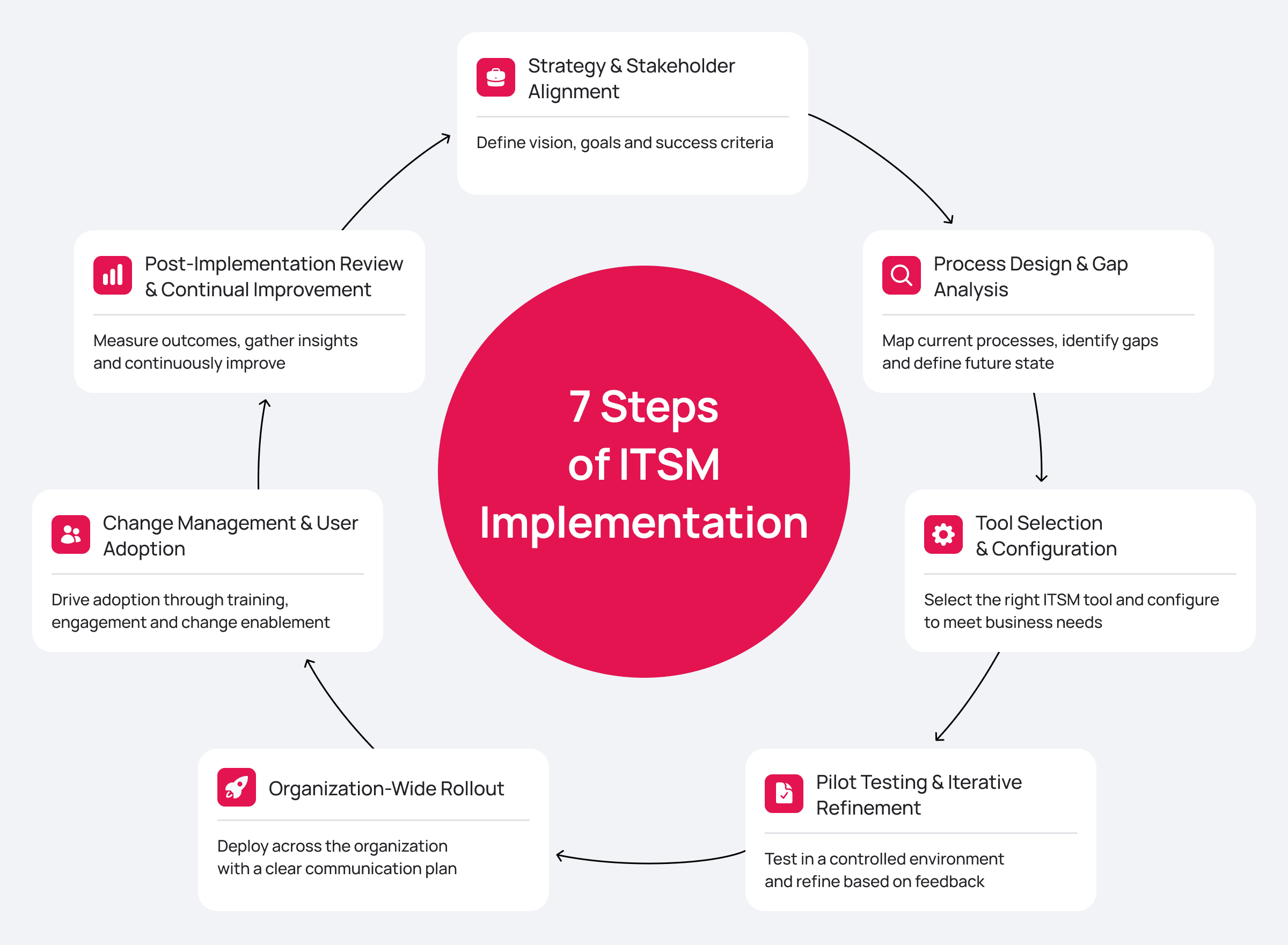
The standard implementation lifecycle usually includes:
- Strategy & Stakeholder Alignment
- Process Design & Gap Analysis
- Tool Selection & Configuration
- Pilot Testing & Iterative Refinement
- Organization-Wide Rollout
- Change Management & User Adoption
- Post-Implementation Review & Continual Improvement
Let’s break down the practical mechanics — and the hidden landmines — of each phase.
Step 1: Strategy and Stakeholder Alignment
The number one reason ITSM initiatives fail has nothing to do with code, it’s mostly a lack of executive sponsorship. If you treat this solely as a software upgrade for the help desk, you will struggle to secure the necessary budget and face massive resistance from other departments.
Before you even look at a vendor demo, you must translate technical IT metrics into a language the C-suite cares about: risk, cost, and revenue. You are not implementing a system to «manage tickets better». You are building a system to «reduce employee downtime by 30% and cut support overhead by 20%».
Defining ITSM Goals and KPIs:
To actually set these business-focused goals, you can’t do it alone in the IT department. You need to form a steering committee — a core group of decision-makers that includes C-level executives (like your CIO and COO) along with department heads from across the organization.
Their job is to help you take standard IT metrics and translate them into goals that the whole business cares about. Here is how that shift in thinking looks in practice:
| Traditional IT Goal | Business-Aligned Strategic Goal |
|---|---|
| Implement a new ticketing portal | Recapture 5,000 hours of lost employee productivity annually through self-service. |
| Map the CMDB | Reduce financial risk by preventing outages of revenue-generating applications. |
| Standardize SLAs | Improve overall Employee Net Promoter Score (eNPS) by delivering predictable support. |
Аdvice: During this phase, you must make a critical strategic decision: will this platform eventually scale beyond IT?
Forward-thinking organizations treat their IT rollout as the foundation for Enterprise Service Management (ESM). Investing in a point-solution restricted only to IT means that within 12 to 24 months — when HR, Legal, and Facilities inevitably want to digitize their chaotic inboxes — you will hit an architectural wall. Build your strategy assuming the platform will eventually serve the entire enterprise.
However, ESM readiness is determined by architecture, not marketing. When evaluating your strategy, you must ask vendors concrete questions to separate true platforms from ITSM systems with “bolted-on” HR modules:
- Is there a single data model? Does the system use the exact same underlying architecture for an IT incident, an HR request, and a Legal approval?
- Are request attributes dynamic? For example, if a manager submits an “Employee Onboarding” request, does the system dynamically create parallel tasks for HR, IT, and Security, ensuring that sensitive fields (like salary) are only visible to the relevant provider within the exact same workflow?
If a vendor’s answer is, “We sell a separate product for HR,” you are not looking at an ESM platform. You are looking at two different applications sharing a logo. True scalability requires a unified foundation.
Step 2: Process Design and Gap Analysis
Do not replicate your currently broken processes in a new, expensive tool. Step two requires mapping your «As-Is» state against your desired «To-Be» state.
Insight: If you browse communities like Spiceworks, you will constantly see IT veterans warning against the «lift and shift» approach. A frequent hard lesson is that companies spend a massive chunk of their budget on a shiny new ITSM platform, only to blindly recreate their old, email-forwarding rules inside it. Then, six months later, they realise that resolution times haven’t improved by a single minute. They essentially paid top dollar to digitize their own chaos.
Аdvice: Ruthlessly simplify the process before you automate it.
Please, do not try to implement all 34 ITIL 4 practices on day one. Attempting a massive, “Big Bang” process overhaul is a guaranteed recipe for blown budgets and burned-out users. Instead, aim for a “Minimum Viable Process.” Figure out where it hurts the most right now, and start with the core practices that will deliver immediate, visible relief to your service desk agents and your end-users.
If you’re wondering exactly where to begin, here is the recommended prioritization of ITIL 4 practices for the initial rollout:
| ITIL 4 Practice | Implementation Priority | Why Start Here? |
|---|---|---|
| Service Request Management (with a Minimum Viable Catalog) | High (Phase 1) | You cannot build a comprehensive Service Catalog without first defining your Service Portfolio. Start small: define 5 to 10 high-volume, standardized request types (e.g., password resets, hardware requests) to set boundaries and stop the chaos of free-text email requests. |
| Incident Management | High (Phase 1) | Standardizing the incident management process stabilizes the IT environment and restores daily operations as quickly as possible. |
| Knowledge Management | High (Phase 1) | A centralized knowledge base accelerates resolution times for L1 and L2 agents, streamlines new hire training, documents Known Errors for future Problem Management, and enables powerful user self-service ticket deflection. |
| Change Enablement | Medium (Phase 2) | Establishes approval workflows to minimize infrastructure risks caused by «cowboy» updates. |
| Problem Management | Medium (Phase 2) | Shifts the team from reactive firefighting to proactive root-cause analysis. |
Step 3: Tool Selection and Configuration
This is the most critical commercial decision you will make. The ITSM market is incredibly crowded, but if you look closely, the platforms out there generally fall into three distinct architectural categories: rigid «out-of-the-box» SaaS tools, heavily customized legacy monoliths, and modern low-code platforms.
When evaluating an IT service management system, focus heavily on architectural flexibility and Total Cost of Ownership (TCO). If every workflow change requires submitting a ticket to the vendor or writing complex backend code, your maintenance costs will skyrocket, and your agility will plummet.
However, be cautious of platforms that advertise themselves as exclusively “no-code.” While great for simple forms, they will inevitably hit a hard ceiling when you need to build complex, non-standard business logic. Mature platforms offer a tiered approach: No-code for business users to make quick tweaks, Low-code for analysts to design workflows, and Pro-code for developers to handle complex integrations.
Insight: Discussions across Reddit’s r/ITSM board frequently highlight the nightmare of hidden development costs. Many companies buy legacy systems that look amazing in sales demos, only to discover later that adding a simple custom approval workflow for their security team requires proprietary scripting. Instead of a quick internal fix by their own admins, they are forced to hire the vendor’s expensive external consultants. Suddenly, a minor workflow tweak turns into a three-week ordeal that blows a hole in the quarterly IT budget.
Аdvice: If every time you need to change a workflow you have to submit a ticket to the vendor or pay someone to write complex backend code, your maintenance costs will skyrocket, and your team’s agility will drop to zero.
To help you navigate the market, here is a quick breakdown of how the three main types of ITSM architectures compare when it comes to long-term ownership:
| Feature | Rigid SaaS Solutions | Legacy Hardcoded Systems | Modern Platform (No/Low/Pro-Code) |
|---|---|---|---|
| Customization | Very limited; you adapt your processes to the tool. | High, but requires expensive developers and complex code. | High; combines visual drag-and-drop builders with the ability to script complex logic when necessary. |
| Time-to-Market for Changes | Depends on vendor update schedules. | Slow; changes require code review and staging. | Fast; analysts can adjust routine processes in days, while developers handle deep integrations safely. |
| Vendor Dependency | Complete dependency. | High dependency on specialized integrators. | Low dependency; allows for strong in-house control. |
| Extensibility (ESM) | Usually requires buying entirely separate products. | Clunky; often requires building from scratch on old architecture. | Native; easily scaled to HR, Legal, and Facilities using the same underlying data model. |
Look for “extensibility beyond IT”. Modern platforms combine powerful service management modules with this tiered low-code core. This allows your internal teams to extend the system and build custom applications visually, entirely free from vendor dependency, while still having the power to write code when the business demands it.
Step 4: Pilot Testing and Iterative Refinement
Never launch a new system to the entire company all at once. A pilot phase isn’t just a safety net; it is absolutely mandatory to mitigate risk and make sure your operations are actually ready.
Advice: Don’t just pick your most tech-savvy, friendly team for the pilot. Pick your biggest internal critics. If you can build a process that satisfies your most demanding business unit, winning over the rest of the company will be a breeze.
The goal here isn’t just to make sure the software doesn’t crash. You are stress-testing your process design, your integrations (like Active Directory and your monitoring tools), and the overall User Experience (UX).
During this pilot run, you will definitely find things that need fixing. You’ll inevitably discover that some categorization rules are too clunky, or that certain approval workflows are creating unnecessary bottlenecks. If you chose a platform with low-code capabilities, this is where it pays off: you can tweak those processes in a matter of hours based on the pilot feedback, rather than waiting weeks for a vendor’s patch cycle.
Step 5: Organization-Wide Rollout
Once the pilot group validates the workflows, integrations, and system stability, you move to the organization-wide rollout.
A phased approach — rolling it out department by department or region by region — is vastly superior to flipping a switch for everyone at once (the «Big Bang» approach). It lets your IT infrastructure absorb the load predictably and, more importantly, gives your support agents time to adapt to their new interface without being overwhelmed.
Leading up to the go-live date, make sure you have a solid communication plan in place so nobody is caught by surprise. Prepare your infrastructure and clean your data. Please, do not migrate years of garbage data into your fresh system. Migrate only active tickets, essential CI data, and current user bases. Finally, conduct intensive, role-based training for your system administrators and first-line operators so they walk in on day one feeling confident.
Step 6: Change Management and User Adoption
Search trends consistently show that ITSM adoption is a massive priority for IT directors, and for good reason. When these projects fail, it is almost never because of software bugs; it’s because of user resistance, cultural friction, and low utilization rates.
According to the “State of Tech Support in 2025” report, information overload (67%) and system complexity (43%) are the primary barriers preventing support staff from mastering new technologies. Additionally, 45% of IT leaders feel their teams are falling behind the curve when trying to use modern support tech effectively.
The takeaway here is brutal but simple: if you deploy an ITSM platform with a cluttered, overly complex interface, your agents will hate working in it. Data quality will plummet as they resort to workarounds or external chats, completely undermining your adoption goals.
Insight: Poor user experience will instantly kill your ROI. Overcomplicating the intake process destroys portal adoption. If a new self-service portal requires users to fill out 12 mandatory dropdown fields just to request a software license or reset a password, it will be abandoned within a week. Users will go right back to messaging technicians on Slack or stopping them in the hallway, bringing the adoption rate to zero simply because IT made it too hard for them to get help.
If the portal is a headache, people simply won’t use it. They’ll find ways around it every time. To drive genuine ITSM adoption, you have to make it easier to use the system than to ignore it. Data shows that in successful enterprise ITSM rollouts, seeing 80% to 90% of requests route through a single portal correlates with a massive acceleration in ROI. Here is what your strategy should focus on:
- A Consumer-Grade Self-Service Portal: The portal must look and feel like a modern e-commerce site (think Amazon), not a database entry form.
- Omnichannel Access: Meet users where they already are. They shouldn’t be forced to log into a portal if they don’t want to. Allow them to submit and track tickets seamlessly via email, corporate messengers (like Teams, Slack, or Telegram), and a mobile app — while ensuring all that context is saved centrally in the system;
- Proactive Knowledge Base Integration: Serve up self-help articles before they hit the «submit» button. Ticket deflection — where the user solves their own problem using a suggested article — is the ultimate metric of adoption success.
How to measure adoption: Monitor the percentage of tickets logged via the portal versus phone calls, track the «time to first value» for new users interacting with the system, and regularly measure employee Net Promoter Score (eNPS) regarding their satisfaction with IT support.
Step 7: Post-Implementation Review and Continual Improvement
You can’t just flip the switch on ITSM and walk away. It’s not a one-and-done software install; it’s a living part of your business that needs constant attention. The moment you treat it as finished, it begins to degrade. As soon as the system stabilizes after go-live, you enter the Continual Service Improvement (CSI) phase.
Keep a formal CSI register. Hold regular retrospectives with your team. Review your SLAs realistically: are they too strict and causing your agents to burn out? Or are they too loose, leaving users frustrated? Continuously look for ways to expand your service catalog to cover more complex IT requests and automate routine tasks.
This is also the natural stage where choosing a platform (rather than just an IT tool) pays huge dividends. After a successful IT rollout, companies frequently realize they can expand this service model. By using the same unified data model and low-code capabilities, IT can help HR, Procurement, and Legal departments build their own service catalogs. This allows you to smoothly transition the company from ITSM into full Enterprise Service Management (ESM).
Critical Success Factors for ITSM Implementation
Post-mortem analyses of countless enterprise IT rollouts reveal a few non-negotiable principles. If you want your ITSM implementation plan to actually hold up over the long haul, these are the factors you need to get right:
- Real Executive Sponsorship: This isn’t just about a signature on a check. Without C-level leaders actively backing your process changes, other departments will simply revert to their old ways the moment things get difficult.
- Pick a Platform, Not Just a Tool: Your company is going to grow. Extensibility is what determines your long-term ROI. Make sure your system can scale horizontally across the whole enterprise without you getting hit with astronomical integration costs.
- Measurable Business KPIs: Use business language, not IT jargon. Instead of reporting on «SLA uptime», tell them you «reduced new-hire onboarding time by 3 days».
- AI is No Longer Optional: In 2026, launching a service desk without AI is basically building in technical debt on day one. Modern platforms use Generative AI to auto-categorize tickets and summarize mile-long email threads for operators. McKinsey data shows that applying GenAI to customer operations — including tech support — can increase productivity by 30 to 45 percent , dramatically accelerating resolution times and reducing the manual burden on service desk agents.
- Iterative Deployment: Don’t wait for perfection. Deploy in phases, get a working version into your users’ hands fast, listen to their feedback, and iterate.
Common ITSM Implementation Challenges
Every project has its hurdles. Here are the traps organizations fall into most often:
- Vendor Lock-in on Customization: This is a highly underestimated problem. You buy a system that looks great in a sales demo, but realize six months later that adding a single custom field requires purchasing a proprietary plugin or hiring the vendor’s expensive consultants. Always make sure you can configure the platform yourself without writing code;
- «Lift and Shift» Mistakes: If you just take your old, broken manual processes and put them into a new tool, you’re just making the mess faster. Redesign for automation from the start;
- The «15-Click» Problem: If it takes your agents 15 clicks to log a simple password reset, they’re going to hate the system and find ways around it. Prioritize the agent experience as much as the end-user’s;
- Data Silos: If your ITSM tool doesn’t talk to your Active Directory or monitoring tools, you’ll be stuck with manual data entry and a lot of preventable errors.
ITSM Implementation Timeline: What to Expect (Realistic Estimates)
How long is a piece of string? Vendor marketing loves to promise a «one-week go-live», but let’s be realistic. Your timeline depends on your size, how clean your data is, and how flexible your platform’s architecture actually is.
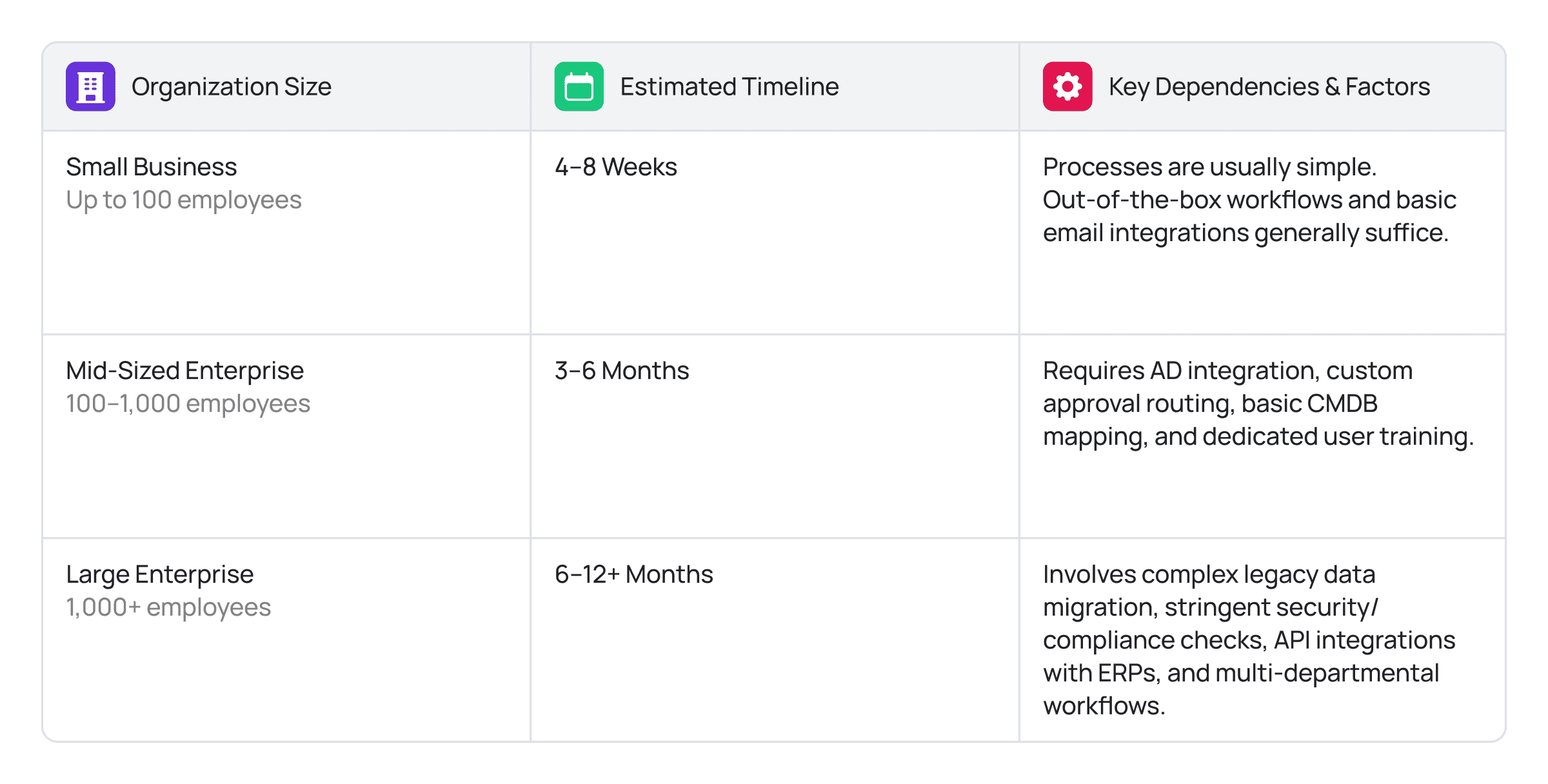
Crucial note: Your architecture dictates your speed. Rigid, hardcoded systems will push you to the limit. However, industry cases show large enterprises go from kickoff to full production in under 120 days because they used a Low-code platform that let them build workflows in days, not months.
Measuring ITSM Implementation Success: KPIs That Matter
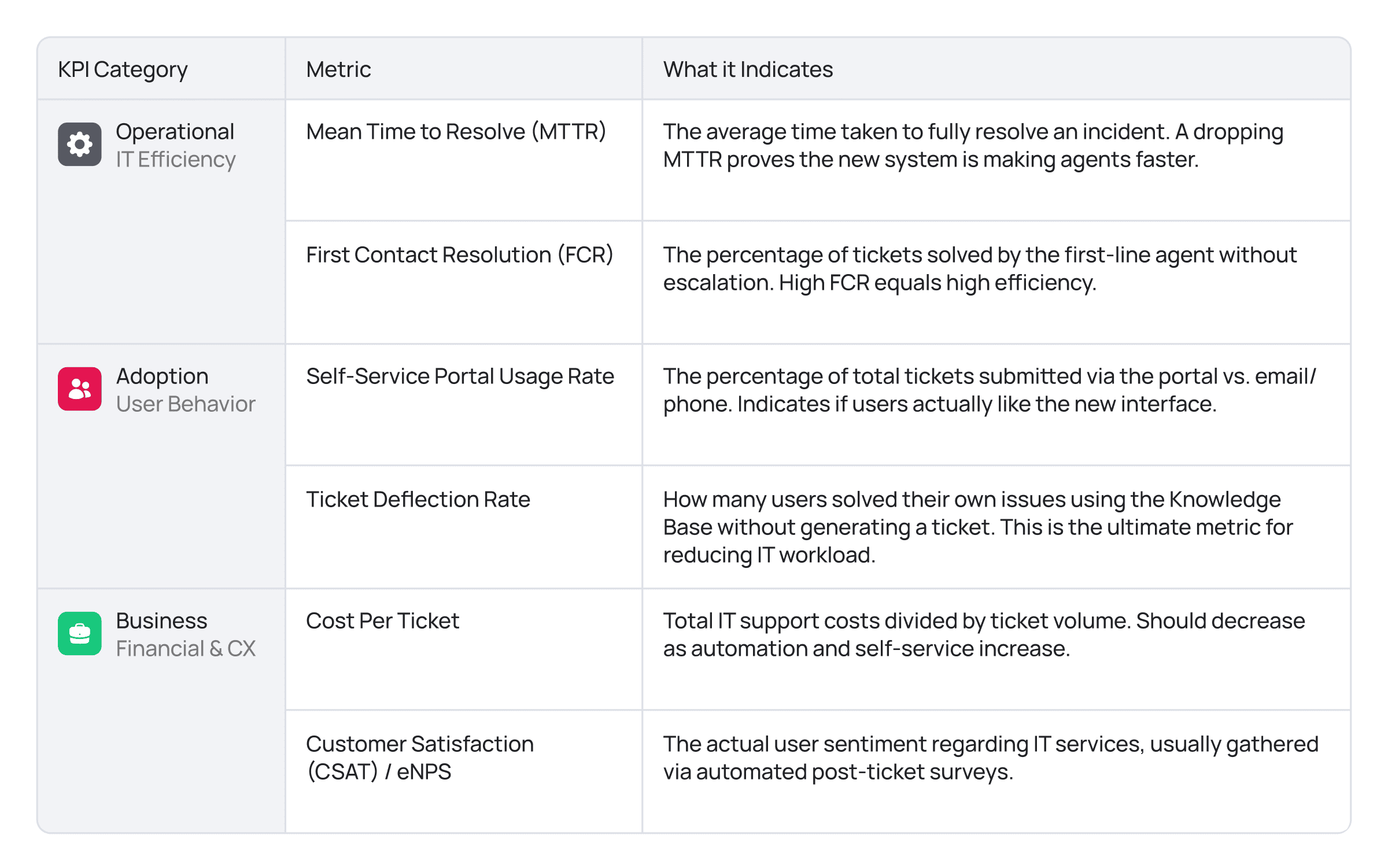
If you can’t measure it, you can’t prove it’s working. To show the board that your ITSM implementation plan was worth the investment, you need to track these three tiers of metrics:
ITSM Implementation Cost: Budgeting for Success
When building your business case, do not just look at the initial license price tag. That is a common trap. You must calculate the Total Cost of Ownership (TCO) over a 3 to 5 year horizon to avoid budget shocks.
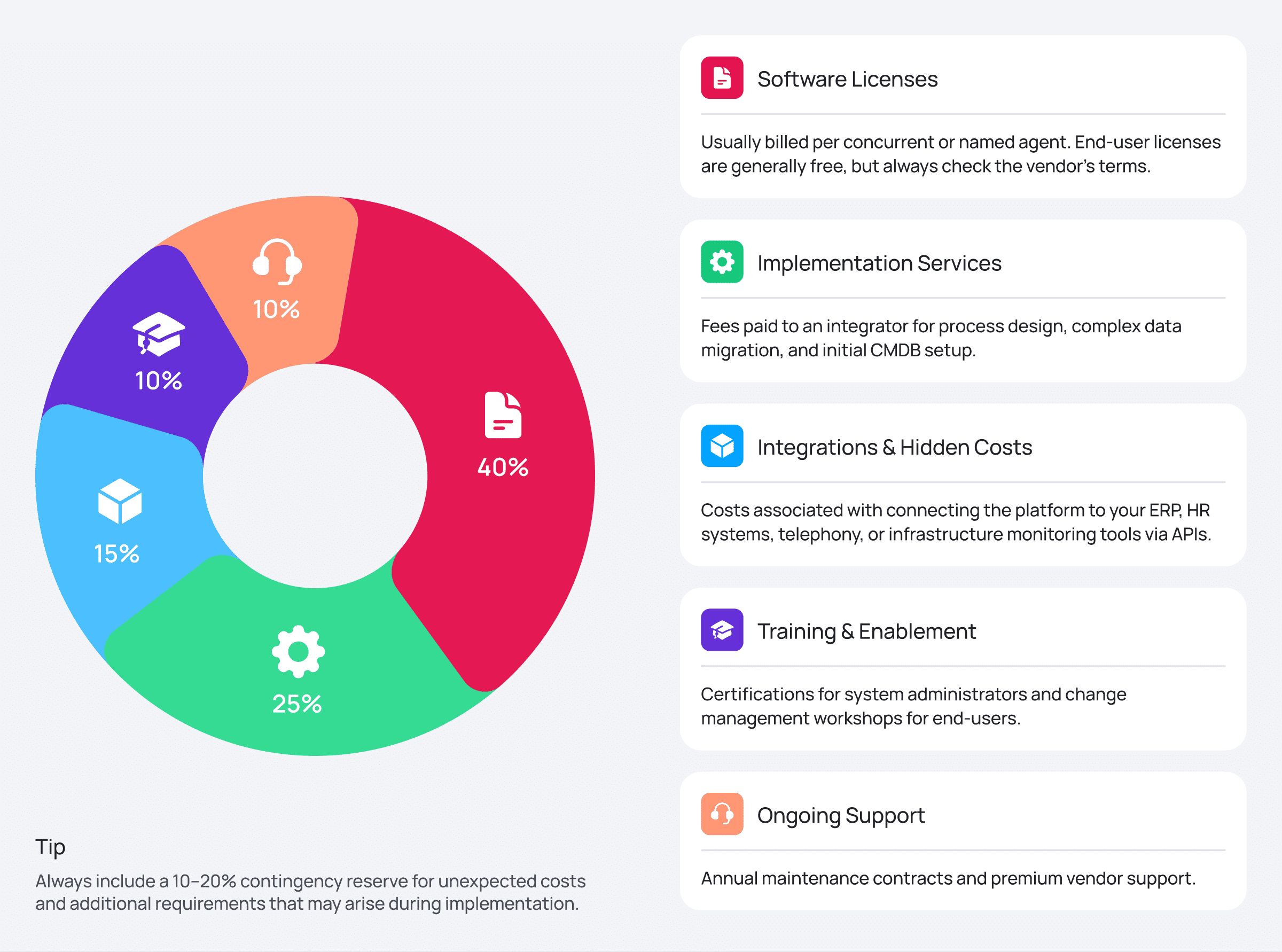
A realistic budget includes:
- Software Licenses: Usually billed per concurrent or named agent (end-user licenses are generally free, but always check the vendor’s terms).
- Implementation Services: Fees paid to an integrator for process design, complex data migration, and initial CMDB setup.
- Integrations: Costs associated with connecting the platform to your ERP, HR systems, telephony, or infrastructure monitoring tools via APIs.
- Training & Enablement: Certifications for system administrators and change management workshops for end-users.
- Ongoing Support: Annual maintenance contracts and premium vendor support.
Beware of hidden TCO costs: The biggest drain on your budget will always be hardcoded customization. If your system is rigid, you’ll spend your whole budget on consultants every time you want to change a business rule. Choosing a platform with a Low-code core lets your own team handle changes, keeping your TCO much lower.
Conclusion
Executing a successful ITSM rollout requires far more than just purchasing software; it demands a strategic alignment of people, optimized processes, and a highly adaptable technology stack. If your current system feels like a bottleneck, it is time to audit your workflows, secure executive buy-in, and execute a phased ITSM adoption plan based on concrete data.
When you’re ready to evaluate your next steps, take the time to look at how modern, low-code ESM platforms — like SimpleOne — actually work under the hood. Seeing how they adapt to your specific roadmap and scale effortlessly alongside your business can entirely change how you plan your rollout.
Frequently Asked Questions (FAQ)
What exactly is ITSM implementation?
At its core, an ITSM implementation is about rethinking how your IT team delivers value. It’s the process of moving from a reactive «firefighting» mode to a structured, service-oriented model. While it involves deploying new software, the real work is in aligning your people and processes to ensure that every incident, change, and service request is handled in a way that actually supports your broader business goals.
How long does an ITSM implementation usually take?
There’s no one-size-fits-all answer here; it depends heavily on your organization’s size and the complexity of your current setup. Generally, a small business can get up and running in 4 to 8 weeks. For mid-sized companies, 3 to 6 months is a more realistic timeframe for mapping out processes and handling integrations. Large enterprises are typically looking at 6 to 12 months, though using modern low-code platforms can often shave months off that schedule by eliminating the need for heavy custom programming.
What are the biggest challenges during an ITSM rollout?
The biggest hurdles usually aren’t technical — they’re human. Low user adoption is a common project killer, often caused by poor interface design or a lack of active buy-in from leadership. On the technical side, «vendor lock-in» is a massive risk. If your system’s architecture is too rigid, even a small change to a business rule can become an expensive, time-consuming ordeal that requires specialized external consultants.
How much should we budget for an ITSM implementation?
Pricing is about far more than just the «sticker price» of the licenses. While costs vary based on your deployment model (SaaS vs. on-premise) and your agent count, you have to look at the Total Cost of Ownership (TCO). A realistic budget needs to cover professional implementation services, data migration, and thorough team training. Crucially, don’t forget to factor in the long-term costs of maintaining and evolving the system as your business changes.
How do you actually measure the success of the implementation?
A best-practice approach evaluates success through three distinct lenses. First, look at operational efficiency: are you resolving incidents faster (MTTR) and solving more issues on the first try (FCR)? Second, look at user adoption: are people actually using the portal, or are they still bypassing the system? Finally, track the strategic business impact: is your customer satisfaction (CSAT) improving and is your overall cost-per-ticket trending down? If all three are moving in the right direction, you have a successful rollout.